CETL is pleased to announce several Blackboard updates that will support teaching, learning, accessibility, and course management this fall. The biggest addition is Blackboard Ally, a new accessibility tool that will help faculty improve course materials and give students more options for engaging with content.
In addition, the August Blackboard release features an updated Gradebook Grid View for more efficient grading, and the addition of AI Virtual Assistant (AVA) to support teaching and communication workflows. Additional updates include improved group management, journal-based release conditions, and enhanced student experience features.
Blackboard Infrastructure Upgrade
Blackboard has upgraded the underlying infrastructure that supports the Blackboard Learning Management System (LMS). These improvements enhance the platform’s security, reliability, and long-term scalability while standardizing the environment across all Blackboard-hosted institutions. As part of this upgrade, Blackboard now operates under higher security compliance standards (Impact Level 4, or IL4), providing a more secure and consistent experience for institutions and their users.
For faculty and students, there are no changes to the way you use Blackboard or your courses. This update, which occurred behind the scenes, aims to enhance the overall stability, security, and reliability of the Blackboard environment.
Ally for Accessibility and Alternative Formats




Ally is a new tool in our Blackboard Learning Management System (LMS) that helps make course content more accessible and usable for all students. Ally automatically reviews uploaded course files, provides accessibility scores, and gives instructors step-by-step feedback for improving materials.
Faculty will begin seeing Ally accessibility indicators next to supported course files. These indicators are only visible to instructors and can be used to identify files that may need attention, such as PDFs, Word documents, images, or other materials with accessibility concerns. Faculty can also use Ally’s Course Accessibility Report to view accessibility issues across a course and prioritize improvements.
Students benefit from Ally through access to alternative formats. Depending on the file type, students may be able to download course materials in formats such as HTML, audio, ePub, electronic Braille, tagged PDF, and other accessible versions. These formats are generated automatically and can support students who use mobile devices, screen readers, audio learning, or other learning preferences.
Please join us for a CDD session C2: Ally in Action: Making Digital Course Content Accessible
Major Blackboard Workflow Updates:
Gradebook Grid View and AI Virtual Assistant
Gradebook Grid View
Blackboard’s updated Gradebook Grid View is designed to make grading work more organized and efficient. Faculty will see a more structured grading experience with views for grade items, students, and overall grade activity. The updated layout helps instructors enter grades, review submissions, post grades, manage exceptions and exemptions, and monitor grading progress from fewer places.
For faculty, this should improve common grading workflows such as identifying work that needs attention, checking student progress, managing accommodations, reviewing grade details, and keeping grading tasks organized across assignments, tests, discussions, and manually created grade items.
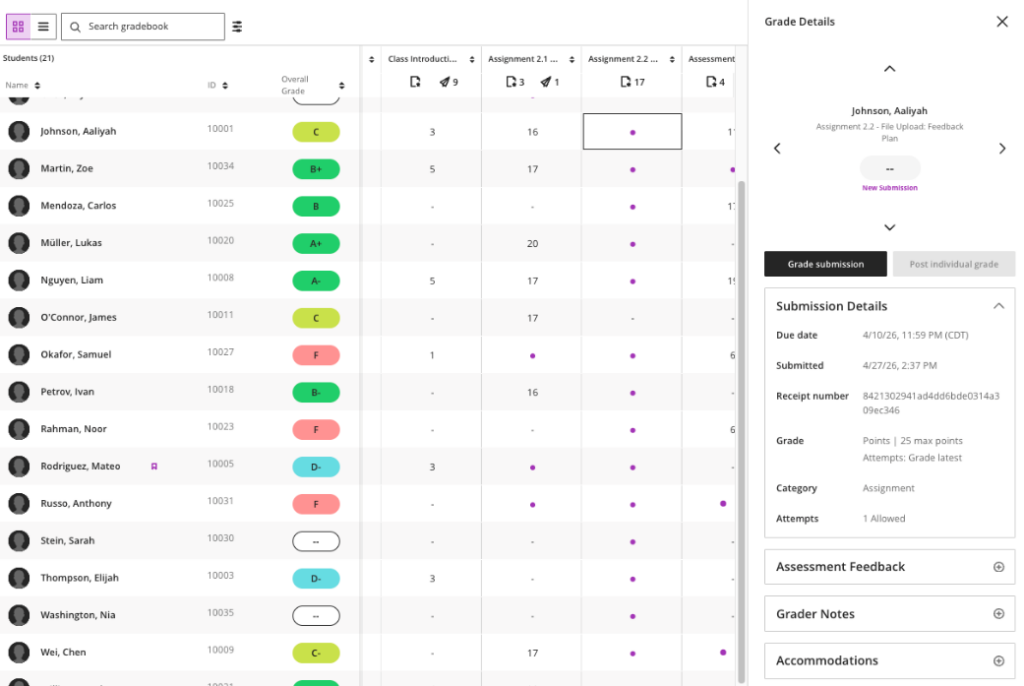
Learn More: Gradebook Overview – Detroit Mercy CETL
NEW: AI Virtual Assistant (AVA)
AVA brings AI-supported assistance into Blackboard for select teaching and communication workflows. AVA can help instructors summarize rubric-based feedback, revise feedback for clarity and tone, and explore instructional ideas. In addition, it can scan course content and responds to common student questions, reducing instructor workload. Faculty remain in control of AVA-generated content. Instructors can review, edit, accept, reject, or regenerate suggestions before using them.
Additional August Release Highlights
Updated Home Button
When users select the Home button from inside a course, Blackboard will now take them directly to the Courses page in the base navigation. This makes it easier for faculty and students to move between courses. The page users see when they first log in is not changing.
Improved Group Management
Faculty can now manage group membership more easily with drag and drop. Instructors can move students into groups, remove individual students from groups, and make adjustments more efficiently. This is especially useful for group projects, labs, discussion groups, and larger courses with frequent enrollment changes.
Journal-Based Release Conditions
Faculty can now release course content based on whether a student has submitted a journal entry. This supports reflective learning, checkpoints, and sequenced activities. For example, an instructor could require students to submit a journal reflection before the next module, resource, or assignment becomes available. Content releases automatically after submission and does not require the instructor to grade the journal first.
Duplicating Course Content Items
Faculty building repeated weekly modules or recurring activities can duplicate course content items more efficiently within a course. This can help instructors reuse consistent structures while still allowing to edit copied items before students see them.
Discussion Sorting
Discussion activity can be easier to review with sorting options for newest or oldest posts. This can help faculty moderate active discussions, review recent participation, and catch up on student activity.
Student Experience Improvements
Students will see improvements that make Blackboard easier to navigate and use. Ally will provide alternative formats for supported course materials, giving students more ways to access content. The updated Home button will make it easier to return to the Courses page and move between courses. Journal-based release conditions can also help students progress through course materials automatically after completing required reflection activities.
Blackboard’s Courses list page now includes a To-Do list, which lists a student’s upcoming assessments that have due dates applied. Note, the availability of this feature makes it more important than ever that faculty include due dates on assessments wherever possible.
Lastly, some notification improvements are also included in the August release, which should help reduce duplicate, missing, or incorrectly timed notifications for certain course activities.
Where to Learn More
Faculty who would like help using Ally, preparing accessible course materials, working with the updated Gradebook, or understanding AVA are encouraged to contact CETL. There are some additional online resources below.
Additional resources:
Gradebook Grid Resource Hub
Ally for Instructors Microlearning Video Series